Wednesday, March 16, 2016

Playing with dbpedia (Sematic Web wikipedia)

Web 3.0, Semantic web, Dbpedia and IOT are all buzz words that are dealing with the computer's ability to understand the data it has. "Understanding" is the key meaning of the semantic web - a concept and a set of technologies and standards that are "almost there" for more than 20 years, but we are not there yet.

You can find additional info about semantic web very easily.

I know that lots of efforts are invested in it, and google are quite semantic. The schema.org project is an effort to create one uniform ontology for the web. But, still, we are not there yet.

What I do like to do is playing with the semantic representation of wikipedia - dbpedia. You can query dbpedia, using Sparql (the semantic web sql).

That is the link for the sparql endpoint - http://dbpedia.org/sparql

And an example of a cool query:

 SELECT distinct ?p ?ed ?u ?t {  
   ?u a dbo:University.  
   ?p ?ed ?u.  
   ?p dbo:knownFor ?t.  
   ?t dbo:programmingLanguage ?j  
 } limit 5000  
We are looking  for people that have any connection to things that are universities (?p ?ed ?u), and that they are "known for" something that has any programmingw language. The results including universities and people that have some kind of contribution to technologies that we are using.

See how easy it is to generalize, or specify the relations that we are looking for.
Of course, that tuining and understanding the ontology and also sparql, might bring much better results.

Run by yourself to see the results.

The results in a graph (I have used ploty for that)
If a university had 2 different "knownAs" it will count for 2.
And The winner is Massachusetts_Institute_of_Technology! 
(Berkeley is #2)

Monday, March 7, 2016

My last meetup slides - Apache Phoenix and Titan over Hbase


It's been a while since the Hadoop meetup that me and @YRodenski hosted - But it's better late than never.
You are welcome to have some fun with the slides:
and learn some phoenix code and concepts here:

Sunday, March 6, 2016

Cheat sheet: Playing with "spark-notbook" and "Ashley Medison" dump

I will try loading "Ashley Medison"  emails' dump from the local file-system into Cassandra, so that it would be easy to look for an email. In addition I will do some batch processing for "bigger" questions such as emails domain distribution -  classic data pipeline.


This is a description of the full dump of Ashley Medison lick:

http://www.hydraze.org/2015/08/ashley-madison-full-dump-has-finally-leaked/

I don't want to get in troubles, so I won't publish any real emails, but only some distributions and interesting facts.


Downloading and Running the notebook.  

From here: http://spark-notebook.io/ choose the spark and hadoop version, type your mail and download. you can download a binary or running the source code using 'sbt run'.

Then just run bin/spark-notebook

It is a good idea to print "hello" from time to time to see if you are still connected. I was struggling when trying to add dependencies and kept loosing my kernel.  It's also important to keep watching the notebook's log (/logs/notbook_name.log).

A really good thing is all the sample notebooks. Just great. They have so many visualization tools, including maps. (remember to start the notebook from its hope directory, and don't get into /bin cause it will not be able to find the sample notebooks with

notebooks load  "not found"


writing simple loading process

The raw data is a sql insert command for all records. We need to extract the emails using regex.

So first, before loading to cassandra, lets make this :


"INSERT INTO `aminno_member_email` VALUES ('email@gmail.com','email2@gmail.com') ...
Into this:
email@gmail.com
email2@gmail.com

Here is the Spark code:
       
val textFile = sc.textFile("/home/spark/aminno_member_email.dump")

val email_records =  textFile.flatMap(a => "[a-zA-Z0-9_.+-]+@[a-zA-Z0-9-]+\\.[a-zA-Z0-9-.]+".r findAllIn a)

email_records.saveAsTextFile("/home/spark/note_out/emails1.txt")


You have to be patient and not refreshing, and eventually the processing bar/success message will appear


and the complete notebook till now:


Now, we can do very cool stuff using bash commands. Counting with `ll | wc -l` or looking for emails with grep. Still, we will now load the output file to Cassandra in order to save us the 30 seconds `grep` time :)


Small little thing before cassandra - Lets play a bit with spark over the data:


Register the txt file as a data frame:


We can browse the results using the notebook:


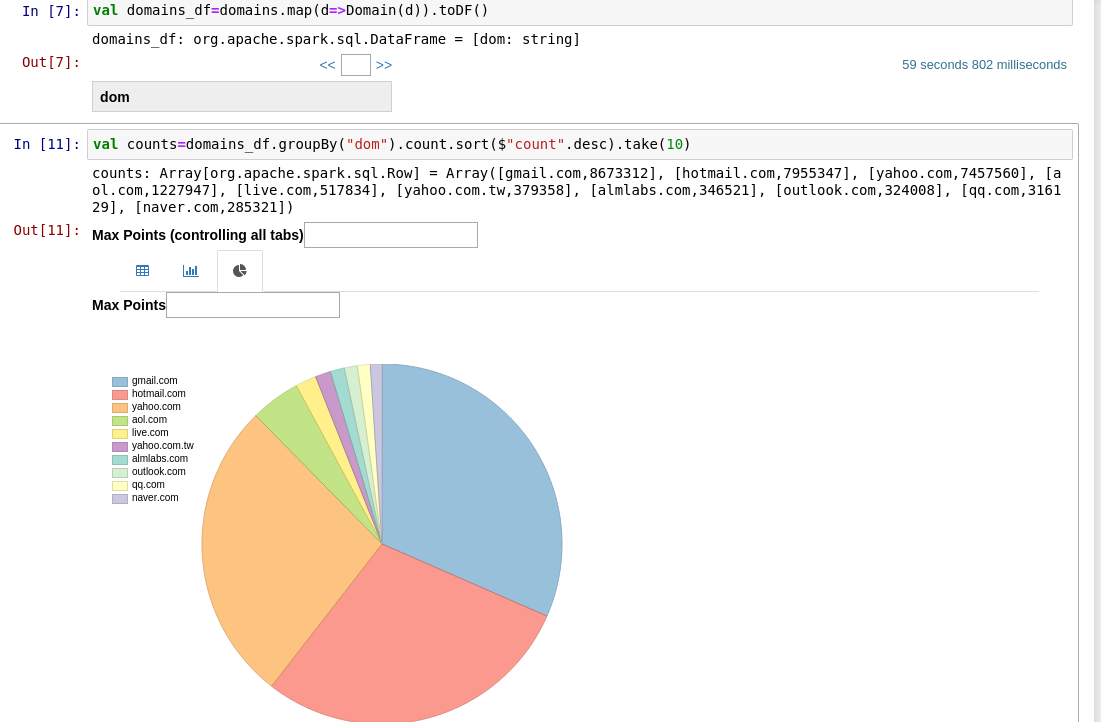
Or look for the most popular email domain in the site:


The notebook has different display and visualization options for every type of results. For instance, when we just "show" results, as above, we will see a nice text output. When we are creating a dataframe, we have a nice table view with search option.


Visualize:

When we have a sql result set, as you can see below, we can out of the box choose a custom chart:  


And,

we can also use   c3js - http://c3js.org/samples/chart_pie.html  


And much much more! So much fun.


Now it is time to load into Cassandra

I couldn't set the cassandra connector in a reasonable time because of dependencies problem, as described here:  http://alvincjin.blogspot.com.au/2015/01/spark-cassandra-connector.html

I decided to go for the spark shell for that.


Create table in cassandra:

cqlsh> create keyspace "notebook" WITH replication = {'class':'SimpleStrategy', 'replication_factor' : 3};
cqlsh> CREATE TABLE notebook.email (address varchar PRIMARY KEY)  ;

(Using Spark 1.6)


spark-shell --packages com.datastax.spark:spark-cassandra-connector_2.10:1.5.0-M3


import com.datastax.spark.connector._
val emails = sc.textFile("/home/spark/note_out/emails4.txt")
val emails_df=emails.toDF("address")
emails_df.write.format("org.apache.spark.sql.cassandra").options(Map( "table" -> "email", "keyspace" -> "notebook")).save()

And once we have all the data loaded, we can look for mail in 0 time!


What can you take from that?
 - spark-notebook is is one of the easiest and fastest ways to start playing with spark, and doing more than basic stuff.
 - It is a bit difficult and not smooth when it comes to dependencies adding.
 - The Ashley Madison most popular domain is gmail of course. Hotmail is the second?! and that they had 36 M emails.
 - How to extract an email in spark
 - How to draw nice charts with spark-notbook
 - How to write a DataFrame into cassandra, and how to use Cassandra connector to spark from spark-shell
 - And most importantly - don't expect any kind of privacy, anywhere on the web.

Tuesday, March 1, 2016

Scala slick - Multiple update with different values

Hi. Again, something that I was expecting to easily find online, but had to implement by myself.

Slick, by typesafe, is a modern database query and access library for Scala. 

We are using slick 3.1.1 in order to access our db.

At some day, we had to update multiple rows, with different values, depending on one of the columns. The new values are coming out of a sequence of one of our objects.

In addition we wanted to do some more inserts, as part of the same transaction.

A simple sql that looks like that: "update table cars set proce=c.price where year=c.year"

Lets say that we want to update a person's details, and to update all of the person's cars' condition and price, according to the sequence of cars that are part of the person object.

We find the corresponding cars in the db with filtering on the car Id column that links between the cars sequence to the cars  table.

We also want to update the person record with the person object in the same transaction

Solution: We are preparing a dbio object of sequence of update actions, and then combining the DBIO of sequence with the person update action, under the same DBIO.seq call.

With slick it looks like that:


def updatePerson(pers: Person, action: String) = {
  val cars = pers.cars
  val update_cars=cars.map(b=> {
    db_cars.filter(cdb=> cdb.car_id===b.car_id).map(r=>(r.condition,r.price)).update(b.condition,b.price)
  })
  val dbio_up_cars= DBIO.sequence(update_cars)

  DBIO.seq(
    db_persons.filter(_.id === pers.id).update(fromPerson(pers)), 
   dbio_up_cars
  )
}

//val db_persons = TableQuery[DbPersons]


where, for that example, the person db object looks like that:

class DbPerson(tag: Tag) extends Table[(Long)](tag, "Persons") {
def id = column[Long]("ID", O.PrimaryKey)


def * = (Id)
}
val db_person = TableQuery[DbPerson]


Good Luck!

Friday, February 26, 2016

SprayJson Scala case classes for Google Maps API response

Hi

I have played a little with Spray Json - A lightweight, clean and simple JSON implementation in Scala

Here is an example of how to easily marshalling a google get reponse for some adderss, using Spray Json and case classes that were built for the responding json.

I hope that anyone who are trying to do so, would save a little time by using the ready to use case classes (Maybe it's a good idea to create a central repository of case classes for common used jsons).

That's the 1st result for searching "melbourne australia" in google maps (originally an array of  2 results).:


 {  
   "results" : [  
    {  
      "address_components" : [  
       {  
         "long_name" : "Melbourne",  
         "short_name" : "Melbourne",  
         "types" : [ "colloquial_area", "locality", "political" ]  
       },  
       {  
         "long_name" : "Victoria",  
         "short_name" : "VIC",  
         "types" : [ "administrative_area_level_1", "political" ]  
       },  
       {  
         "long_name" : "Australia",  
         "short_name" : "AU",  
         "types" : [ "country", "political" ]  
       }  
      ],  
      "formatted_address" : "Melbourne VIC, Australia",  
      "geometry" : {  
       "bounds" : {  
         "northeast" : {  
          "lat" : -37.4598457,  
          "lng" : 145.76474  
         },  
         "southwest" : {  
          "lat" : -38.2607199,  
          "lng" : 144.3944921  
         }  
       },  
       "location" : {  
         "lat" : -37.814107,  
         "lng" : 144.96328  
       },  
       "location_type" : "APPROXIMATE",  
       "viewport" : {  
         "northeast" : {  
          "lat" : -37.4598457,  
          "lng" : 145.76474  
         },  
         "southwest" : {  
          "lat" : -38.2607199,  
          "lng" : 144.3944921  
         }  
       }  
      },  
      "partial_match" : true,  
      "place_id" : "ChIJ90260rVG1moRkM2MIXVWBAQ",  
      "types" : [ "colloquial_area", "locality", "political" ]  
    }
   ],  
   "status" : "OK"  
 }  

And that's the Code, including the case classes that are used for parsing the json:

 /**  
  * Created by gilad on 24/02/16.  
  */  
 import spray.json._  
 import DefaultJsonProtocol._  
 import scala.io.Source.fromURL  
 object FetchCoordinates extends App{  
  
  @throws(classOf[java.io.IOException])  
  @throws(classOf[java.net.SocketTimeoutException])  
  def get(url: String,  
      connectTimeout:Int =5000,  
      readTimeout:Int =5000,  
      requestMethod: String = "GET") = {  
   import java.net.{URL, HttpURLConnection}  
   val connection = (new URL(url)).openConnection.asInstanceOf[HttpURLConnection]  
   connection.setConnectTimeout(connectTimeout)  
   connection.setReadTimeout(readTimeout)  
   connection.setRequestMethod(requestMethod)  
   val inputStream = connection.getInputStream  
   val content = io.Source.fromInputStream(inputStream).mkString  
   if (inputStream != null) inputStream.close  
   content  
  }  
  try {  
   val address = "melbourneaustralia"  
   val content = get("http://maps.googleapis.com/maps/api/geocode/json?address="+address+"&sensor=true")  
   val contentJs=content.parseJson  
   val googleRes = contentJs.convertTo[GoogleMapResponse]  
   val form_address= googleRes.results(0).formatted_address  
   println(googleRes.status)  
  } catch {  
   case ioe: java.io.IOException => // handle this  
   case ste: java.net.SocketTimeoutException => // handle this  
  }  
 }  

Case classes:


 import spray.json._  
 import DefaultJsonProtocol._  
 case class JsonCoords(lat:Long,lng:Long)  
 object JsonCoords { implicit val f = jsonFormat2(JsonCoords.apply)}  
 case class JsonBounds(northeast:JsonCoords,southwest:JsonCoords)  
 object JsonBounds { implicit val f = jsonFormat2(JsonBounds.apply)}  
 case class JsonGeometry(bounds:JsonBounds,location_type:String, viewport: JsonBounds)  
 object JsonGeometry { implicit val f = jsonFormat3(JsonGeometry.apply)}  
 case class JsonAddress(long_name:String,short_name:String,types:Seq[String])  
 object JsonAddress { implicit val f = jsonFormat3(JsonAddress.apply)}  
 case class JsonGoogleResult(address_components:Seq[JsonAddress],formatted_address:String,  
               geometry:JsonGeometry,partial_match:Boolean,place_id:String,types:Seq[String]  
                )  
 object JsonGoogleResult { implicit val f = jsonFormat6(JsonGoogleResult.apply)}  
 case class GoogleMapResponse(results:Seq[JsonGoogleResult],status:String)  
 object GoogleMapResponse { implicit val f = jsonFormat2(GoogleMapResponse.apply)}